

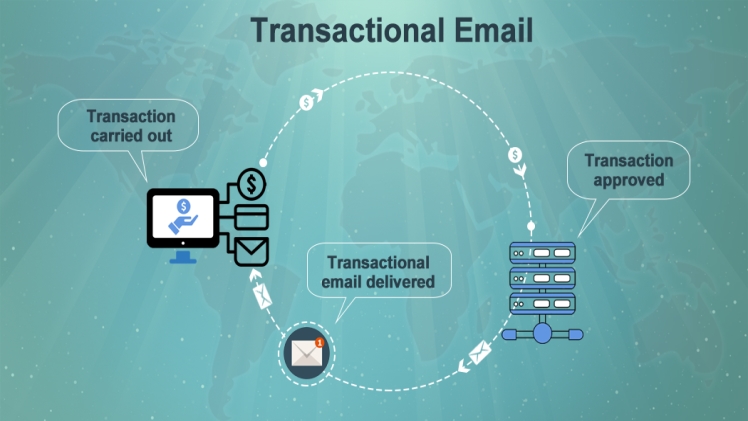
It is an email you send to a customer based on an action they’ve taken on your website or application. Unlike marketing emails which are usually sent in bulk, it is a one-to-one email unique to the recipient.
You don’t need explicit consent to send transactional messages because the recipient has triggered the action needing your response. It’s the opposite of marketing emails, where you obtain prior consent or risk getting blacklisted for spam.
This type of message is usually automated. You create a template that gets filled in with customer data and sent in response to their actions.
Top Types Of Transactional Emails
There are many types of transactional emails. The main ones every marketer should know are briefly discussed below.
1.Welcome message
You send such emails to customers who create an account on your website or sign up for your email list. It welcomes them to your service and lets them know what to expect from you. You can also use the opportunity to advertise products or services and convince the customer to stick to your brand.
Welcome messages are often personalized using the recipient’s data, e.g. name and location.
2.Password reset
Customers can opt to reset their account passwords at any time. You’ll then send them an email with a unique link to complete the request. The customer follows the link to a web page where they can change and confirm their new password. The entire process is automated, so you don’t need to worry about being disturbed by users.
3.Abandoned cart
Quite often people add items to carts in online stores but don’t complete their purchase. Online retailers send an email to remind customers about the goods they’ve left in their carts. After receiving this mail, some recipients might follow through with the purchase, earning you sales you would otherwise have lost.
You can include discounts or offer free delivery to encourage recipients to complete their purchases.
4.Order confirmation
You send this message immediately after a customer orders an item from your store. It confirms the customer’s order and includes relevant information like price, quantity of items, and expected delivery date.
5.Delivery confirmation
You send this email after delivering an item to a customer’s specified location. It should include relevant details such as delivery date, time, and further instructions for the customer to collect their parcel.
6.Opt-in
Opt-in emails confirm an action that a customer has triggered on your website. For example, if a customer adds their email address to your subscriber list, you can send a message to confirm the addition. This message includes a unique link the customer clicks to confirm they are registering for your service.
7.Request for feedback
After rendering a service to a customer, you can send an email requesting feedback. Customer opinions help you learn how to enhance your service for future clients. Existing customers can voice complaints about your service, letting you know what needs improvement.
You can request customers to post a review with this message. This way, satisfied customers can leave high ratings that other interested persons will see.
8.Account notifications
You send this message to alert customers of any changes to their accounts, e.g., username and password changes. This email is critical because some customers might fall victim to hacking. Account notifications let them immediately react to any unauthorized changes and prevent further damage.
Bottom Line
We have explained what transactional emails are and listed the main types every marketer should be aware of. This information enables marketers to foster better customer relationships, which translates into higher sales in the long run.
